A small business website should not be built once and forgotten. It should change as the business changes, as customers ask new questions, and as the owner understands more about what visitors need.
Many website problems are not obvious from the inside. A business owner may think the service page is clear, but visitors may still wonder what is included. A designer may create a beautiful homepage, but customers may struggle to find the phone number. A contact form may look simple, but people may leave because they do not know what happens after submitting it.
This is why customer feedback matters. It helps small businesses improve their websites based on real visitor experience, not only personal opinions.
Why Feedback Matters for a Small Business Website
A website is a communication tool. It introduces the business, explains services, builds trust, and invites customers to take action.
But communication is not complete unless the business understands how visitors respond.
Feedback can answer important questions:
- Was the homepage clear?
- Did visitors understand the services?
- Was pricing or quote information missing?
- Was the contact process easy?
- Did the website feel trustworthy?
- What stopped someone from sending a request?
These answers can help improve page structure, service descriptions, calls to action, FAQs, and contact forms.
Without feedback, website improvement becomes guesswork.
Start With the Questions Customers Already Ask
The easiest way to improve a website is to look at repeated customer questions.
If people often ask what is included in a service, the service page needs more detail. If they ask where you work, the website should show service areas more clearly. If they ask how to book or request a quote, the contact path needs improvement.
Small business owners often already have useful feedback in emails, phone calls, messages, and conversations.
Before adding new design blocks, review the questions customers ask most often. Those questions can become FAQ sections, homepage blocks, service page explanations, or contact form hints.
Use Feedback to Improve Service Pages
Service pages are one of the best places to apply customer feedback.
A weak service page only says what the company offers. A strong service page explains what the service includes, who it is for, how the process works, and what the customer should do next.
Feedback can show which parts are unclear.
For example, if visitors ask whether a consultation is free, add that detail to the page. If customers ask how long the project takes, add a timeline section. If people ask whether you work with small businesses, make that clear in the introduction.
The best service pages are built around real customer doubts.
Add Simple Feedback Points to the Website
Feedback does not always require a long survey. Sometimes a small question is enough.
A website can ask:
- Was this page helpful?
- What information were you looking for?
- What almost stopped you from contacting us?
- Which service are you interested in?
- What should we explain better?
These questions can be placed on a service page, after a blog post, in a contact form, or in a short follow-up email after a project.
The goal is not to collect hundreds of answers immediately. The goal is to create a habit of listening.
Dedicated Section: Using Survey Ninja for Website Feedback
For a more organized feedback process, a small business can use a survey tool such as Survey Ninja. It allows users to create surveys, collect responses, and review answers through built-in summaries and analysis. Survey Ninja also supports logic jumps, which means respondents can be shown different questions depending on their previous answers.
This is useful for small business websites because not every visitor needs the same questions. For example, someone interested in a redesign can see questions about their current website, while someone looking for a new site can be asked about business type, required pages, and launch goals.
Survey Ninja surveys can be shared through a link and used across different channels, including websites, social media, messengers, and email. Its market research page also describes use cases such as collecting feedback, testing ideas, and assessing engagement.
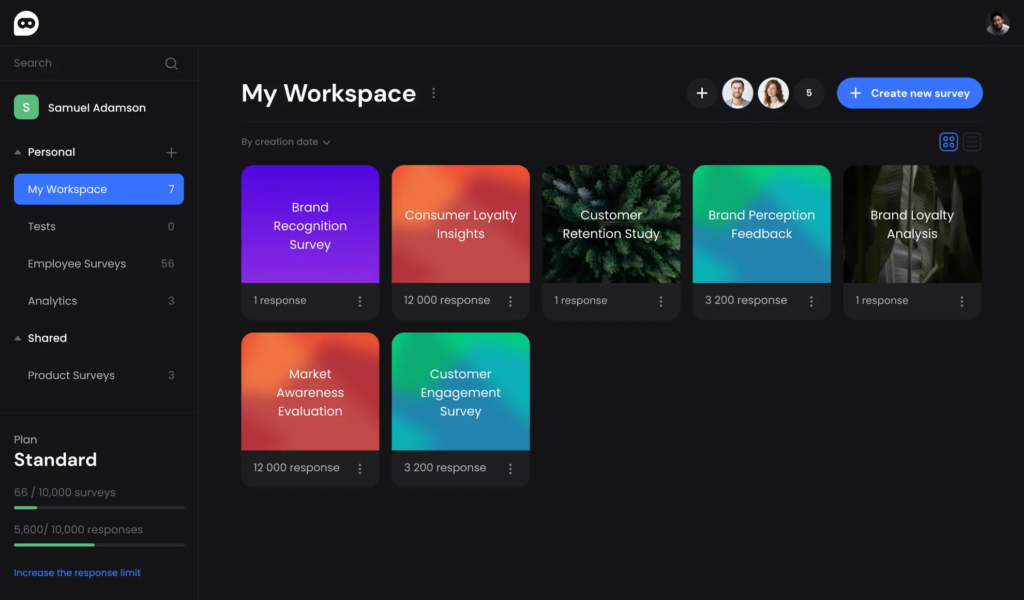
For a small business website, Survey Ninja can be used for:
- Website feedback forms
- Customer satisfaction surveys
- Pre-project questionnaires
- Service interest surveys
- Post-launch feedback
- Content clarity checks
- Lead qualification questions
The most practical approach is to keep the survey short. Ask only the questions you will actually use to improve the website or service process.
Turn Feedback Into Website Updates
Collecting feedback is only useful if the business acts on it.
If several visitors say the homepage is unclear, rewrite the first screen. If people do not understand your services, add clearer service blocks. If customers ask the same pricing questions, explain how quotes are calculated. If users say the contact form is too long, simplify it.
Feedback should lead to specific changes.
A small business website can be improved gradually:
- Rewrite one headline
- Add one FAQ answer
- Move the phone number higher
- Add a service area section
- Shorten the contact form
- Improve a service page
- Add testimonials
- Explain the next step after inquiry
Small updates can make the website easier to use without requiring a full redesign.
Use Feedback Before a Redesign
Before redesigning a website, many business owners focus on appearance. They want a more modern look, new colors, or updated images.
That may help, but feedback can show whether the real issue is deeper.
Maybe visitors do not understand the offer. Maybe the service page is too short. Maybe the mobile version is hard to scan. Maybe contact options are hidden. Maybe the website does not answer the questions customers ask before buying.
A short feedback survey before redesign can prevent wasted work. It helps the redesign focus on real problems, not only visual preferences.
Keep Feedback Simple and Regular
Small businesses do not need complex research systems to learn from customers. A few simple questions asked consistently can provide enough insight to improve the website.
The key is regularity.
Ask for feedback after a project. Add a short survey to important pages. Review customer emails for repeated questions. Watch which parts of the website create confusion. Update pages when patterns appear.
A website becomes stronger when it reflects real customer language and real customer concerns.
Final Thoughts
Customer feedback is one of the most practical ways to improve a small business website. It helps business owners understand what visitors need, what confuses them, and what should be changed.
A website should not be designed only from the company’s point of view. It should be shaped by the people who use it.
Tools like Survey Ninja can help organize the feedback process, but the main principle is simple: ask better questions, listen carefully, and turn answers into clear website improvements.